File Dependencies is one of the interactive graphs Understand can draw of your code — call trees, dependencies, control flow, and more.
File Dependencies
| Targets | Architectures |
| Languages | Any |
| Variants | Classic Compare |
Show dependencies between files in the selected architecture.
File Dependencies - Classic
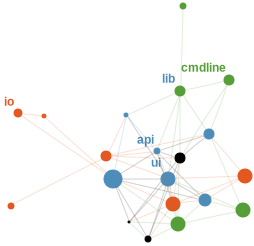
See the Dependencies graph for a description of architecture dependencies. This graph shows the same relationships, but instead of clustering by child architectures, all files (recursively) are shown. The size of the file circle is scaled by the lines of code.
The color indicates the child architecture. The sample project below is split into four architectures:
lib(orange): logging and vector-math utilities with no dependencies of its ownapi(light blue): an entity/scene/renderer layer built onlibui(dark blue): a small application built onapicmdline(green): a command-line tool built onapi
See Graph Architecture for a graphical view of the architecture organization.
File Dependencies - Compare
See the Dependencies graph for a description of architecture dependencies. This graph shows the same relationships, but instead of clustering by child architectures, all files (recursively) are shown. The size of the file circle is scaled by the lines of code.
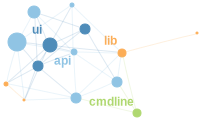
The Compare variant shows how the graph has changed relative to the project's comparison database.
In this variant, color shows each file's change status instead of its architecture: added files are green, removed files are red, changed files are blue, and unchanged files are black. Each child architecture's name labels one of its files and is colored by the architecture's status. Edges use the same colors: a green edge is a new dependency, a red edge is a dependency that is gone, and a blue edge is a dependency whose references changed.
The sample below is the project used by the Dependencies graphs. Its comparison
database is an earlier version of the project; see Graph Architecture for the folders and files that
changed since then. The removed io files are red, along with the edges
from scene.cpp, which used them to save the scene. The new
cmdline/main.cpp is green, as are its dependencies on the
renderer files and math.h. Each renamed file appears as a
red and green pair: the edges to vec2.h are red and the matching edges
to math.h are green, and the same happens for app.cpp's
edges to the view and window files. The renamed
Entity members turn the edges from entity.cpp to
entity.h, scene.cpp to entity.cpp, and
app.cpp to entity.h blue.